
Agri Expert Registration Guide
कृषि विशेषज्ञ पंजीकरण गाइड
Before you start — gather these
- A working mobile number + email
- Personal address with PIN
- Specialisation (Soil, Pest, Irrigation, Horticulture, etc.)
- Brief bio — your background, years of experience, qualifications
शुरू करने से पहले — ये तैयार रखें
- चालू मोबाइल नंबर + ईमेल
- व्यक्तिगत पता और पिनकोड
- विशेषज्ञता (मिट्टी, कीट, सिंचाई, बागवानी आदि)
- संक्षिप्त परिचय — पृष्ठभूमि, अनुभव के वर्ष, योग्यताएँ
Basic Details & OTP
मूल विवरण और OTP
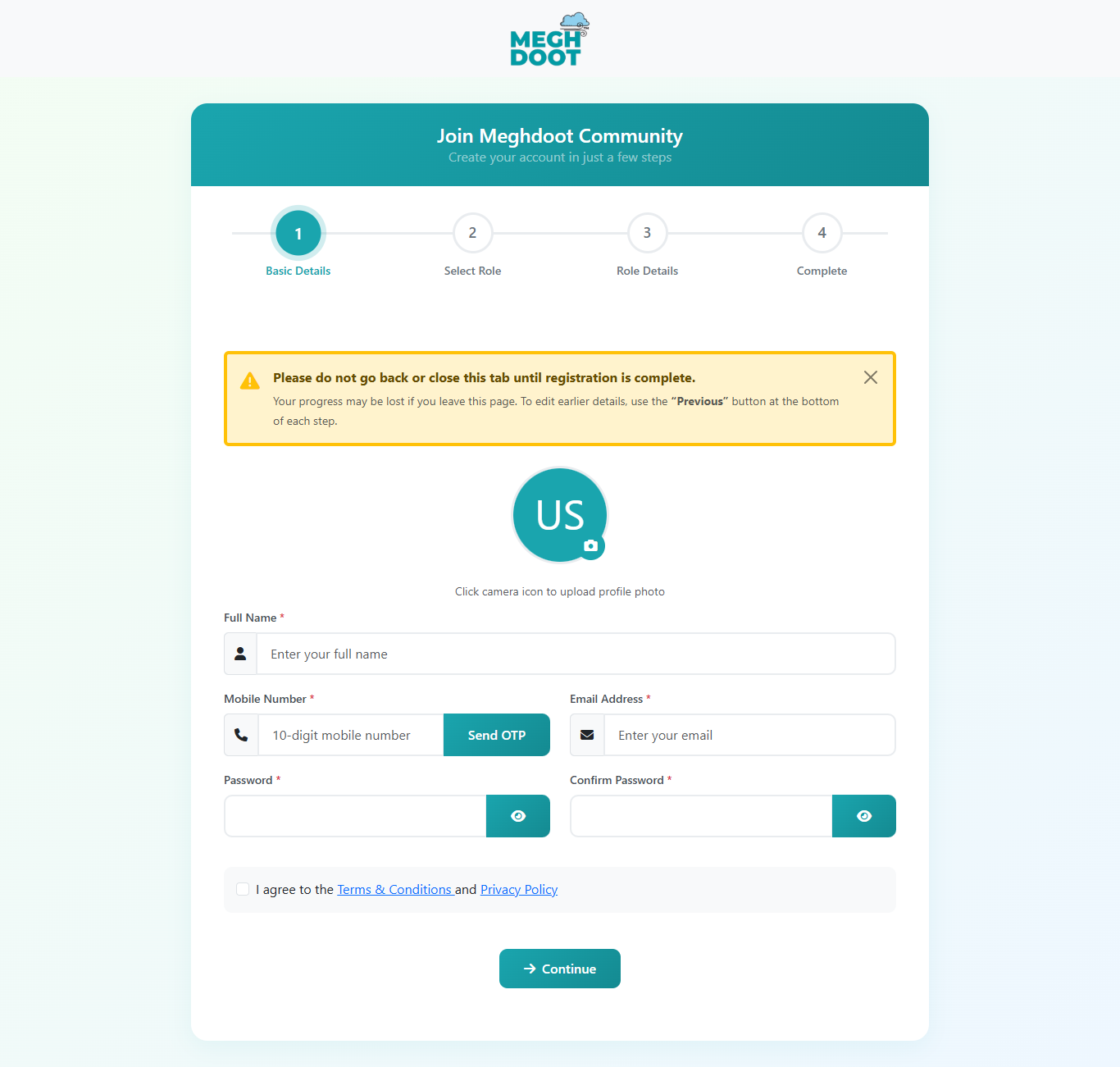
| Field | Required | What goes here |
|---|---|---|
| फ़ील्ड | आवश्यक | क्या दर्ज करें |
| Profile Photo | Opt. | Click the camera icon to upload your photo. |
| प्रोफ़ाइल फोटो | वैक. | कैमरा आइकन से अपनी फोटो अपलोड करें। |
| Full Name | Yes | Full legal name (must match ID proof). |
| पूरा नाम | हाँ | पूरा कानूनी नाम (पहचान पत्र से मेल खाना चाहिए)। |
| Mobile Number | Yes | 10-digit Indian mobile. Click Send OTP; code arrives in ~30 seconds. |
| मोबाइल नंबर | हाँ | 10 अंकों का भारतीय मोबाइल। Send OTP पर क्लिक करें; ~30 सेकंड में कोड आएगा। |
| Email Address | Yes | Valid email — all alerts and reports go here. |
| ईमेल पता | हाँ | वैध ईमेल — सभी अलर्ट और रिपोर्ट यहाँ आएँगे। |
| Password / Confirm | Yes | Min. 6 characters. Re-type to confirm. |
| पासवर्ड / पुष्टि | हाँ | कम से कम 6 वर्ण; पुष्टि के लिए दोबारा दर्ज करें। |
| Terms & Conditions | Yes | Tick the box to accept. |
| नियम और शर्तें | हाँ | स्वीकार करने के लिए चेकबॉक्स पर टिक करें। |
- Type the mobile number → click Send OTP.
- SMS arrives in ~30 seconds with a 6-digit code.
- Type the code, click Verify → green tick confirms.
- OTP is valid for 5 minutes; tap Send OTP again to refresh.
- 3 failed attempts trigger a 15-minute lockout.
- मोबाइल नंबर डालें → Send OTP पर क्लिक करें।
- ~30 सेकंड में 6-अंकों का SMS कोड आएगा।
- कोड डालें, Verify पर क्लिक → हरा टिक पुष्टि करेगा।
- OTP 5 मिनट तक वैध; नया लेने के लिए Send OTP फिर दबाएँ।
- 3 बार गलत भेजने पर 15 मिनट का लॉकआउट।
Select Your Role
अपनी भूमिका चुनें
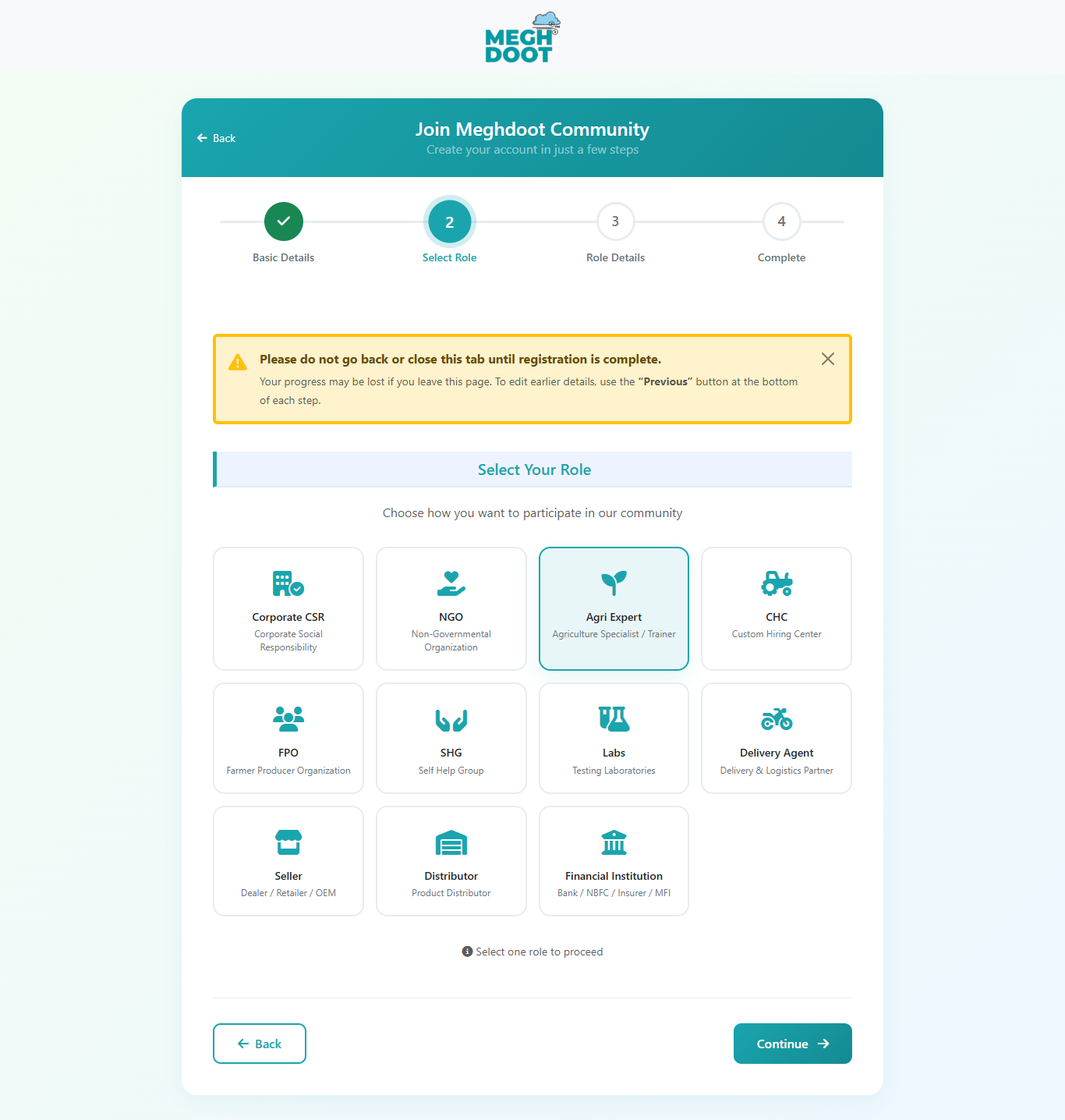
Click the Agri Expert tile (Row 1 · third), then click Continue.
कृषि विशेषज्ञ टाइल पर क्लिक करें (पंक्ति 1 · तीसरा), फिर Continue पर क्लिक करें।
Agri Expert — Provide expert advice to farmers in your specialty.
कृषि विशेषज्ञ — अपनी विशेषज्ञता में किसानों को सलाह दें।
Role Details
भूमिका विवरण
 Click to zoom
ज़ूम के लिए क्लिक करें
Click to zoom
ज़ूम के लिए क्लिक करें
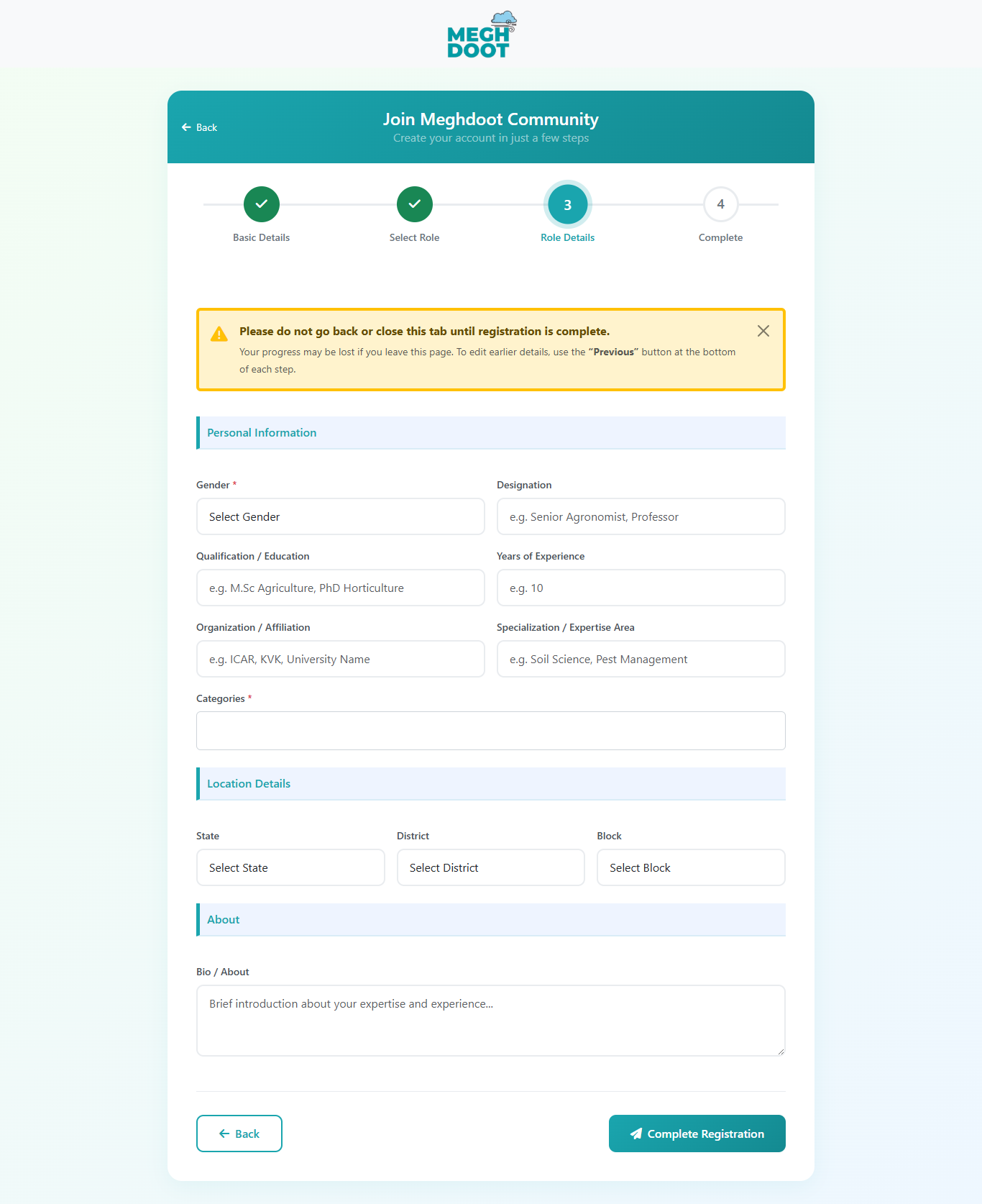
Below is the Agri Expert Step 3 form on screen. The exact fields shown here are listed and explained in the sections that follow.
नीचे स्क्रीन पर दिखाया गया कृषि विशेषज्ञ का Step 3 फ़ॉर्म है। यहाँ दिखाए गए फ़ील्ड्स की पूरी सूची और व्याख्या नीचे के सेक्शनों में दी गई है।
Required fields are marked with Yes in the tables below; optional ones with Opt..
अनिवार्य फ़ील्ड्स नीचे की तालिका में हाँ से चिन्हित हैं; वैकल्पिक वैक. से।
| Field | Required | What goes here |
|---|---|---|
| Address | Yes | Your contact address. |
| State / District / Block | Yes | Cascading dropdowns. |
| PIN Code | Yes | 6-digit PIN. |
| Field | Required | What goes here |
|---|---|---|
| Specialisation | Yes | Pick one or more (Soil, Pest, Irrigation, Horticulture, etc.). |
| Years of Experience | Yes | Whole number, e.g. 8. |
| Qualifications | Yes | Degrees / certifications, comma-separated. |
| Short Bio | Yes | 3–5 lines — past organisations, focus, languages spoken. |
| Field | Required | What goes here |
|---|---|---|
| Confirmation | Yes | Tick and submit. No document uploads at this stage. |
| फ़ील्ड | आवश्यक | क्या दर्ज करें |
|---|---|---|
| पता | हाँ | आपका संपर्क पता। |
| राज्य / जिला / ब्लॉक | हाँ | क्रमिक ड्रॉपडाउन। |
| पिनकोड | हाँ | 6 अंक का पिनकोड। |
| फ़ील्ड | आवश्यक | क्या दर्ज करें |
|---|---|---|
| विशेषज्ञता | हाँ | एक या अधिक चुनें (मिट्टी, कीट, सिंचाई, बागवानी आदि)। |
| अनुभव के वर्ष | हाँ | पूरी संख्या, जैसे 8। |
| योग्यताएँ | हाँ | डिग्री / प्रमाण-पत्र, कॉमा-सेपरेटेड। |
| संक्षिप्त परिचय | हाँ | 3–5 पंक्तियाँ — पिछली संस्थाएँ, फ़ोकस, बोली जाने वाली भाषाएँ। |
| फ़ील्ड | आवश्यक | क्या दर्ज करें |
|---|---|---|
| पुष्टि | हाँ | टिक करें और सबमिट करें। इस चरण में कोई दस्तावेज़ अपलोड नहीं। |
Completion & First Login
पूर्णता और पहला लॉगिन
- Confirmation screen with your registration ID.
- Welcome email goes to the address from Step 1.
- Account is in "Awaiting verification" — admin verifies in 1–5 business days.
- Open the Meghdoot portal in your browser.
- Click Login at the top right.
- Enter your registered mobile + password from Step 1.
- Your role dashboard opens — you can start using the platform.
- आपकी पंजीकरण ID के साथ पुष्टि स्क्रीन।
- Step 1 के ईमेल पते पर स्वागत संदेश।
- खाता "सत्यापन के लिए लंबित" — एडमिन 1–5 कार्य दिवस में सत्यापित करेंगे।
- ब्राउज़र में Meghdoot पोर्टल खोलें।
- दाएँ-शीर्ष पर Login पर क्लिक करें।
- Step 1 का मोबाइल + पासवर्ड डालें।
- आपका डैशबोर्ड खुल जाएगा — प्लेटफ़ॉर्म इस्तेमाल शुरू करें।
Common Issues — Quick Answers
आम समस्याएँ — त्वरित उत्तर
| Issue | What to do | |
|---|---|---|
| Do I need a degree? | Not strictly, but listed qualifications help build farmer trust. | |
| How are queries assigned? | Based on specialisation match + farmer's district + your availability flag. | |
| Approval time | Typical 1–2 business days. | |
| समस्या | क्या करें | |
|---|---|---|
| क्या डिग्री ज़रूरी है? | अनिवार्य नहीं, पर योग्यताएँ डालने से किसानों का भरोसा बढ़ता है। | |
| सवाल कैसे आते हैं? | विशेषज्ञता मैच + किसान का जिला + आपकी उपलब्धता के आधार पर। | |
| मंज़ूरी का समय | आम तौर पर 1–2 कार्य दिवस। | |
Thank you for partnering with Meghdoot.
Together, we work towards dignified, resilient farming.
मेघदूत के साथ साझेदारी के लिए धन्यवाद।
मिलकर, हम सम्मानजनक और सशक्त खेती की ओर बढ़ते हैं।