Registration Manual
SHG Registration Guide
Self-Help Group
पंजीकरण गाइड
एसएचजी पंजीकरण गाइड
स्वयं सहायता समूह
A 4-step walkthrough · about 12 minutes
4-चरण की प्रक्रिया · लगभग 12 मिनट
Before you start — gather these
- A working mobile number + email
- SHG Name + formation date + member count
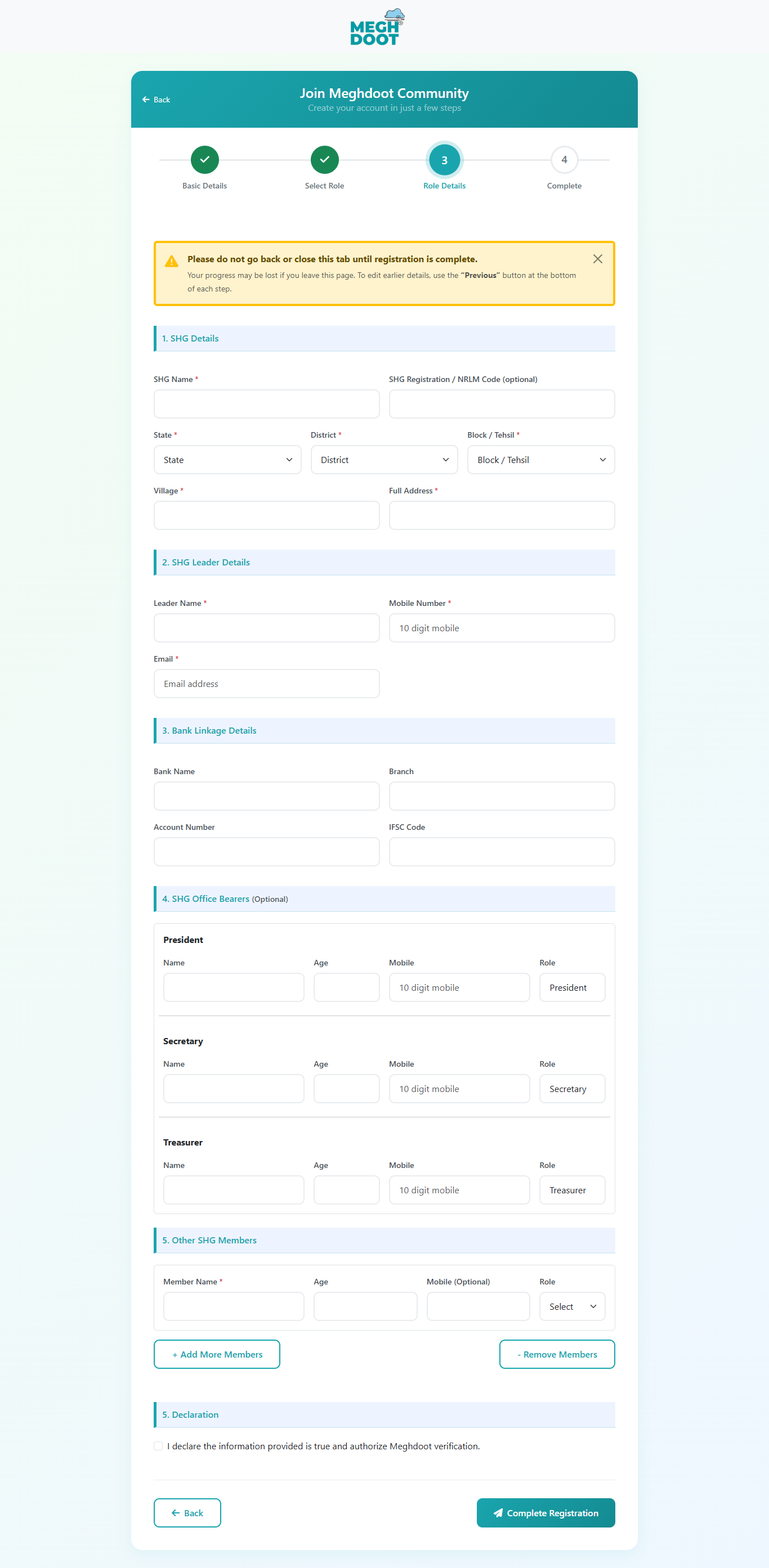
- Office bearers — President, Secretary, Treasurer (names + mobile)
- Bank details + bank passbook copy
- Documents: SHG resolution / formation document
शुरू करने से पहले — ये तैयार रखें
- चालू मोबाइल नंबर + ईमेल
- SHG का नाम + गठन तिथि + सदस्य संख्या
- पदाधिकारी — अध्यक्ष, सचिव, कोषाध्यक्ष (नाम + मोबाइल)
- बैंक विवरण + बैंक पासबुक की कॉपी
- दस्तावेज़: SHG रेज़ोल्यूशन / गठन दस्तावेज़
Step 1 / 4
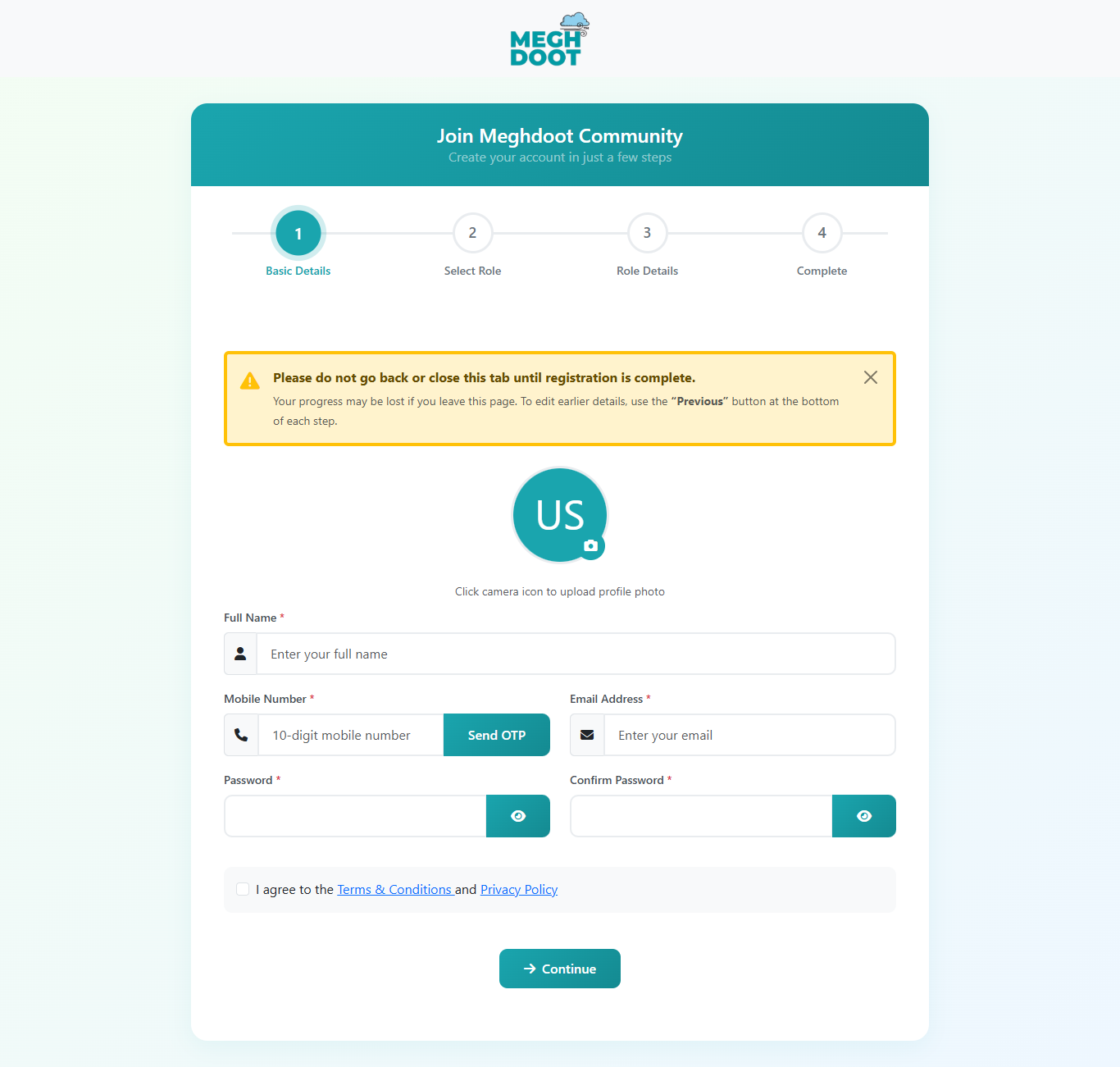
Basic Details & OTP
मूल विवरण और OTP
Your name, contact and a password — about 2 minutes.
नाम, संपर्क और पासवर्ड — लगभग 2 मिनट।
1Basic Detailsमूल विवरण
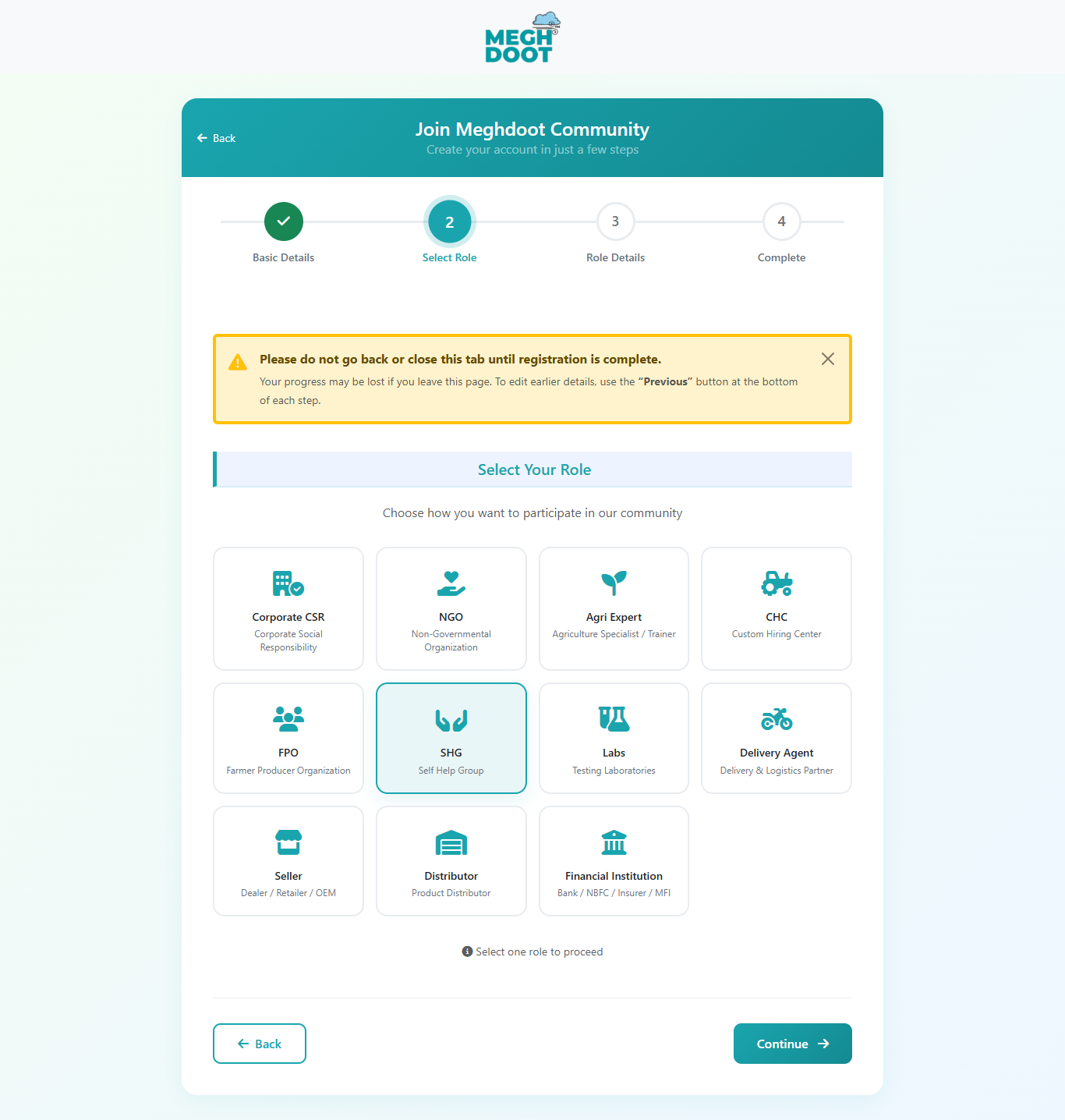
2Select Roleभूमिका
3Role Detailsविवरण
4Completeपूर्ण
| Field | Required | What goes here |
| फ़ील्ड | आवश्यक | क्या दर्ज करें |
| Profile Photo | Opt. | Click the camera icon to upload your photo. |
| प्रोफ़ाइल फोटो | वैक. | कैमरा आइकन से अपनी फोटो अपलोड करें। |
| Full Name | Yes | Full legal name (must match ID proof). |
| पूरा नाम | हाँ | पूरा कानूनी नाम (पहचान पत्र से मेल खाना चाहिए)। |
| Mobile Number | Yes | 10-digit Indian mobile. Click Send OTP; code arrives in ~30 seconds. |
| मोबाइल नंबर | हाँ | 10 अंकों का भारतीय मोबाइल। Send OTP पर क्लिक करें; ~30 सेकंड में कोड आएगा। |
| Email Address | Yes | Valid email — all alerts and reports go here. |
| ईमेल पता | हाँ | वैध ईमेल — सभी अलर्ट और रिपोर्ट यहाँ आएँगे। |
| Password / Confirm | Yes | Min. 6 characters. Re-type to confirm. |
| पासवर्ड / पुष्टि | हाँ | कम से कम 6 वर्ण; पुष्टि के लिए दोबारा दर्ज करें। |
| Terms & Conditions | Yes | Tick the box to accept. |
| नियम और शर्तें | हाँ | स्वीकार करने के लिए चेकबॉक्स पर टिक करें। |
OTP — how the one-time code works
OTP — एक-बार का कोड कैसे काम करता है
- Type the mobile number → click Send OTP.
- SMS arrives in ~30 seconds with a 6-digit code.
- Type the code, click Verify → green tick confirms.
- OTP is valid for 5 minutes; tap Send OTP again to refresh.
- 3 failed attempts trigger a 15-minute lockout.
- मोबाइल नंबर डालें → Send OTP पर क्लिक करें।
- ~30 सेकंड में 6-अंकों का SMS कोड आएगा।
- कोड डालें, Verify पर क्लिक → हरा टिक पुष्टि करेगा।
- OTP 5 मिनट तक वैध; नया लेने के लिए Send OTP फिर दबाएँ।
- 3 बार गलत भेजने पर 15 मिनट का लॉकआउट।
Don't refresh or close the tab mid-registration. Progress isn't saved until you reach Step 4.
पंजीकरण के बीच में टैब रिफ्रेश या बंद न करें। प्रगति Step 4 पर पहुँचने तक सहेजी नहीं जाती।
Step 4 / 4
Completion & First Login
पूर्णता और पहला लॉगिन
You're done filling — here's what happens next.
भरना पूरा हो गया — अब आगे यह होगा।
Basic Detailsमूल विवरण
Select Roleभूमिका
Role Detailsविवरण
4Completeपूर्ण
After you submit
- Confirmation screen with your registration ID.
- Welcome email goes to the address from Step 1.
- Account is in "Awaiting verification" — admin verifies in 1–5 business days.
Logging in
- Open the Meghdoot portal in your browser.
- Click Login at the top right.
- Enter your registered mobile + password from Step 1.
- Your role dashboard opens — you can start using the platform.
सबमिट करने के बाद
- आपकी पंजीकरण ID के साथ पुष्टि स्क्रीन।
- Step 1 के ईमेल पते पर स्वागत संदेश।
- खाता "सत्यापन के लिए लंबित" — एडमिन 1–5 कार्य दिवस में सत्यापित करेंगे।
लॉगिन कैसे करें
- ब्राउज़र में Meghdoot पोर्टल खोलें।
- दाएँ-शीर्ष पर Login पर क्लिक करें।
- Step 1 का मोबाइल + पासवर्ड डालें।
- आपका डैशबोर्ड खुल जाएगा — प्लेटफ़ॉर्म इस्तेमाल शुरू करें।
Common Issues — Quick Answers
आम समस्याएँ — त्वरित उत्तर
| Issue | What to do |
|---|
| Change office bearer later? |
Yes — Profile → Office Bearers; needs admin re-approval with a fresh resolution. |
| No formal registration |
Informal SHGs are accepted with a self-declared formation document signed by all members. |
| Approval time |
Typical 2–3 business days. |
| समस्या | क्या करें |
|---|
| पदाधिकारी बाद में बदलें? |
हाँ — Profile → Office Bearers; नए रेज़ोल्यूशन के साथ एडमिन की पुनः मंज़ूरी ज़रूरी। |
| औपचारिक पंजीकरण नहीं है |
अनौपचारिक SHG भी स्वीकार — सभी सदस्यों द्वारा हस्ताक्षरित स्व-घोषित गठन दस्तावेज़ ज़रूरी। |
| मंज़ूरी का समय |
आम तौर पर 2–3 कार्य दिवस। |
Thank you for partnering with Meghdoot.
Together, we work towards dignified, resilient farming.
मेघदूत के साथ साझेदारी के लिए धन्यवाद।
मिलकर, हम सम्मानजनक और सशक्त खेती की ओर बढ़ते हैं।

 Click to zoom
ज़ूम के लिए क्लिक करें
Click to zoom
ज़ूम के लिए क्लिक करें